


Tools Thumbnail maker

Thumbnails with your face, in seconds.

Describe the video and get four thumbnails in your style — with your own face, bold text and the contrast that gets the click.

Try:

Thumbnails are made with your account — see an example set below.

What you get

From one line to ready to post.

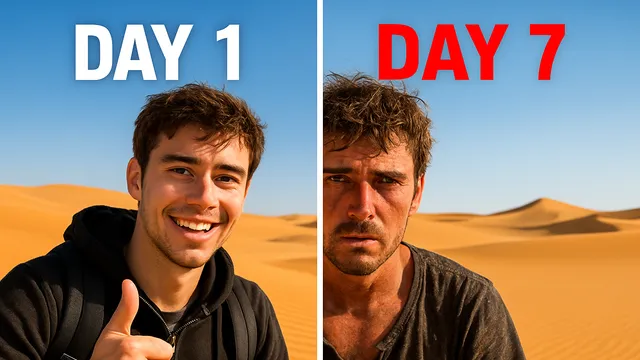
This is what comes back for “I survived 7 days in the Sahara”. Every result is editable, and on a paid plan it learns your style.

Try it with your idea
I survived 7 days in the Sahara Your face
7 DAYSNO WATER?DAY 1 vs 7I QUIT?
How it works

Three steps, about a minute.

  1. 01Describe the videoA title you have in mind, or a sentence about what happens in it.
  2. 02Add your face onceUpload a few photos and every thumbnail can use your own expressions.
  3. 03Pick and editFour options at 16:9 and 9:16. Change the words, then download or post.

What a thumbnail has to do

A thumbnail is seen for about a second, at the size of a stamp, next to a dozen others. The ones that win have one clear subject, an emotion you can read from across the room, strong contrast, and three words or fewer. Everything else is noise at that size.

Faces help because people read expressions instantly — surprise, worry, delight. A close, well-lit face looking at the subject of the video does more than any graphic.

Your face, and your guests

Upload a few photos of yourself once, and every thumbnail can use your own face and expressions. Interviewing someone or reacting to a guest? Save them as a person from one to three photos and put up to two people in the same thumbnail — each kept recognisable, placed where the scene needs them.

You can also sketch the layout — you on the left, the result on the right, the text at the top — and the thumbnail follows it.

Test, then keep what wins

Make an A/B set and you get three thumbnails in deliberately different directions: an emotional reaction, a curiosity gap and the result. Run them in YouTube’s Test & Compare and record the winner; over time EarnedPost shows which faces, words and compositions win on your own channel.

Every thumbnail opens in an editor: move and restyle the text for free, change one thing (“make it night”) and keep the rest, or reframe it for Shorts and square posts.

FAQ

Good to know.

Which plans include it?

Both. Thumbnails are priced per image: one uses 3 credits and a set of four uses 10 — or 30 in HD or with your own face. Creator’s 300 monthly credits cover 30 sets of four, or 10 sets with your face.

Can I try it first?

Image generation is the costly part, so thumbnails are made inside your account. The set on this page is a real example of what comes back.

Who owns the thumbnails?

You do. Use them anywhere, commercially or not.

Is my face shared?

No. Face-pack photos are only used for your own thumbnails, and you can delete them at any time.

More toolsAll tools

Your next viral post starts here.

Connect your accounts in two minutes and post everywhere today.

6 platforms · 2 months free on yearly · Cancel anytime